


by: Farhad Divecha
G.A. Gold – How to Remove fbclid from Google Analytics Page Reports
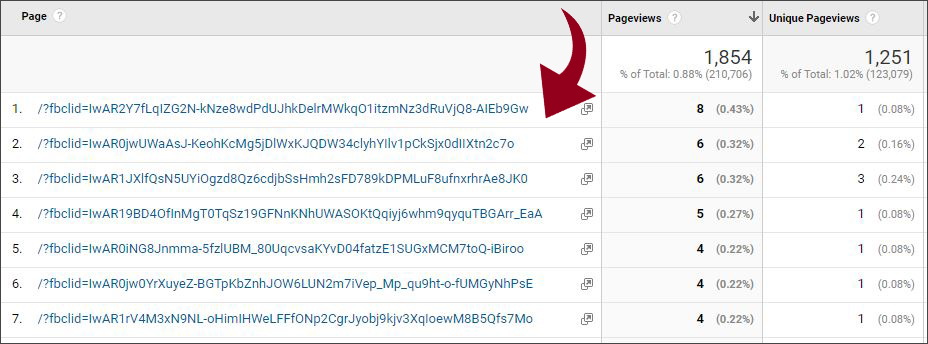
Ever wondered what all of those veeery long parameters starting with ‘fbclid=’ are in your Google Analytics page reports? And, how can you get rid of them? Fortunately, the solution is very simple, and we’re going to show you how. In our example, you can see that it’s the home page being reported on (which typically shows as just / in the page reports). While you might want to look at the data relating to that page as a whole, you’re unable to do so easily because the parameters cause each page to be treated separately by Analytics.
What does the fbclid parameter do?
The parameter is added to urls by Facebook so that they can track a link click to your site from their platform via ads or organically. It serves no useful purpose for advertisers to have the parameter string in their Google Analytics page reports, and in fact it can be a real challenge when you’re trying to analyse traffic to a single page. The problem is that Google Analytics sees each url containing the unique tracking parameter as different, so it separates the data for each out onto a separate line in reports.
 Exclude the fbclid parameter
Here’s how to do it (you will need the right level of Admin permissions):
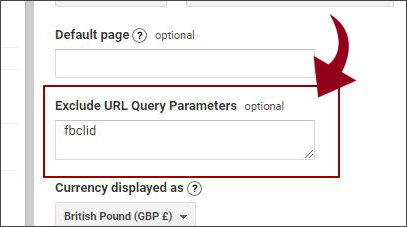
- Log into Google Analytics and go to Admin > View Settings > Exclude URL Query Parameters
- In the field, type in ‘fbclid’ and hit save. That’s it!
Things to keep in mind:
- The change will be immediate but not retrospective so, unfortunately, your reports will still show the separated page data for historical date ranges.
- Although you can remove the parameter from the field at any time, the change to the data is permanent, so be sure it’s really what you want to do before going ahead
- If there are other query parameters in the field, you need to separate each of them by using a comma.
About the Author

Farhad is the Group CEO of AccuraCast. With over 20 years of experience in digital, Farhad is one of the leading technical marketing experts in the world. His specialities include digital strategy, international business, product marketing, measurement, marketing with data, technical SEO, and growth analytics.